You Are Almost Never Alone on a Network
When you connect to Wi-Fi at home, at school, or in a cafe, your computer is not connecting to the internet directly.
It first joins a local network.
A local network is a small network of devices connected together in the same place. That usually includes:
- your laptop
- your phone
- your router
- your smart TV
- printers
- game consoles
- other people's devices
All of these devices need a way to communicate. To make that possible, each one gets its own address.
That address is called an IP address.
Think of a local network like an apartment building.
The building is the network.
Each apartment has its own number.
That apartment number is like an IP address.
Why This Matters
If you know how to look at a network, you can quickly answer questions like:
- How many devices are connected?
- Which device is the router?
- Is there a printer on this network?
- Are there devices here I did not expect?
This is one of the first useful skills in networking and security because it turns an invisible environment into something you can inspect.
Network visibility is the first step to securityThe Two Things to Remember
For this mini-course, you only need to remember two simple ideas:
1. A local network contains multiple devices
If devices share the same Wi-Fi or the same router, they are usually part of the same local network.
2. Every device has an IP address
That IP address is what lets devices send data to each other.
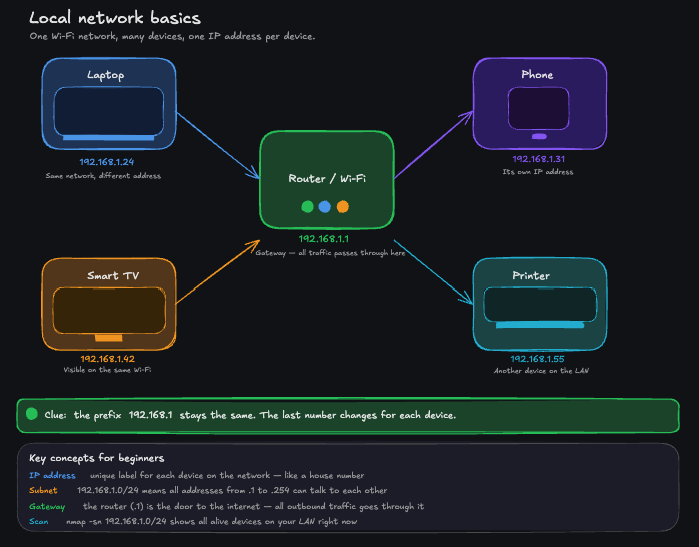
You do not need to memorize everything about networking yet. Just keep this picture in your head:
- one network
- many devices
- one IP address per device
A Typical Example
A very common home network looks like this:
- router ->
192.168.1.1 - laptop ->
192.168.1.24 - phone ->
192.168.1.31 - smart TV ->
192.168.1.42
Notice something important:
The beginning is the same: 192.168.1
Only the last number changes.
That is a clue that these devices belong to the same local network.
When many IP addresses start the same way, they are often on the same local network.
What You Will Do Next
In the next lesson, you will find your own IP address from the terminal.
That is the first real step before scanning the rest of the network.
What is a local network?
Next Lesson
Next: Find Your IP Address